Providing The Best, Update-To-Date Information On The Best In Computer, Gadget And Tablet PC
Showing posts with label Tablet Reviews. Show all posts

Android Honeycomb Tablet

Posted by Admin September 13, 2011 0 comments
Android Honeycomb Tablet
Today is the day – the first Honeycomb tablet officially hits the market today, arriving at Verizon stores and Best Buys across the United States. And on the 2nd we will finally hear from Apple about their new iteration of the iPad.

The year of the tablet is officially underway and that means there will soon be more tablets than we know what to do with crowding shelf space at your local electronics store. What role will Android play in the new market and how will the platform develop in 2011? Right now we are still guessing, but there are quite a few possibilities.

Full Android Functionality

For those that wanted a full scale PC experience on a tablet computer, the early Android releases like the Galaxy Tab were a little disappointing. Samsung’s first foray into the tablet market was impressive, but it was pared down quite a bit due to the use of Android 2.2, an OS designed for mobile phones.

With Honeycomb finally here, we will likely start to see new apps and possibly even new tablets that can do exciting things. It will still be a bit of time though before the apps roll in as the final Honeycomb SDK was just released on Tuesday. But, with new tablets coming from the likes of LG and Toshiba, plus Motorola throwing quite a bit of marketing weight into their first slate, Android is getting a strong push in 2011.

The Enterprise

An area we should keep a close eye is the enterprise. Companies are clamoring right now to adopt and integrate tablet PCs into their technology plans. But, thus far only the iPad has made an impact in the enterprise community, mostly because there were so few competitors in 2010. Even though Apple claims 80% of Fortune 500 companies are exploring enterprise use of the iPad, I imagine many will take a closer look at Honeycomb tablets as a potential alternative in 2011.

The iPad is not built for enterprise use, and while Apple has produced a handful of features and is expanding support for enterprise on the platform, the open nature of Android is friendlier for IT departments that must contend with support tickets and content control on a mobile scale. Third party companies are already arriving with solutions for Android like push app installation, remote support and rebooting, remote content control, and lost or stolen device detection.

And while BlackBerry Playbook will surely be a factor in the enterprise discussion this year, until it is released, there is no way to know if it will be the device to fill the gaping hole in enterprise mobility or if Honeycomb can make headway in that market.

What Happens Next?

Everyone wants to know what happens next – will Apple slide in market share to Android as it did in the smart phone market? Or will Apple’s commanding lead be bolstered by the iPad 2, likely arriving sometime between April and June? It is impossible to know for sure, but one thing is for certain – the arrival of Honeycomb is going to have a big impact on the tablet market and we will all be watching very closely.

Samsung Galaxy Tab Review

Posted by Admin August 27, 2011 0 comments

Although the iPad two is the undisputed leader in the tablet segment, there are lots of other devices that deserve over a second look. For example, there is Motorola's Xoom and RIM's BlackBerry Playbook. However, the most viable alternative appears to be the Samsung Galaxy Tab ten.1. It is the next evolution after the success of the original Samsung Galaxy Tab which featured the first tablet implementation of the Android operating process. This time around, though, it will use the most recent Honeycomb version of Android - a specially designed OS with a tablet-friendly user interface.

samsung galaxi tab

Samsung Galaxy Tablet Specs

This latest model presents a massive leap forward in terms of features. The central processing unit is NVIDIA's highly regarded 1GHz dual-core Tegra 2. The screen actual estate is larger at ten.1", with a generous resolution of 1280 x 800, ensuring sharp visuals. It also comes with Bluetooth and GPS modules. The rear camera has a 3MP sensor that can do 720p video recording, while the front-facing camera has a 2MP sensor, handy for video conferencing and similar applications.

The Samsung Tablet ten.1 will be offered in variants according to Net connectivity options: WiFi and 3G. It weighs a mere one.25 pounds compared to the iPad2's one.33 pounds. As for thickness, it also blows away the competition, coming in at a razor narrow 8.66mm. Perhaps the best attribute of this mobile tool is its excellent battery life, with a 7000mAh module that can provide up to 9hrs of video and 72hrs of music.

Galaxy Tab Release Date

The ten.1 will be available beginning June 8. The grand launch will be held at Best Buy's New York outlet. For other retailers, availability will commence on June 17. The 3G variant will appear by the finish of the summer season. The European launch date is yet to be determined.

Galaxy Tablet Cost

With such a wonderful list of specs, people might think that its cost is out of reach for them to buy the Samsung tablet. This is far from the truth, however, as the prices are reasonable at $499 for 16GB of storage and $599 for the much roomier 32GB version. Note that the prices quoted are for the Wi-Fi only model.

Galaxy Tab Review

If a feature comparison is to be made among all the leading tablets, there is no doubt that the Galaxy Tab will come out supreme. Its NVIDIA dual-core CPU is accompanied by graphics know-how with muscle for advanced gambling. The graphic interface provides unparalleled user experience thanks to the Honeycomb OS. Every application can be launched and operated without any difficulty. Those who enjoy browsing videos on YouTube and playing online games will be glad to know that it fully supports Flash.

The Samsung Galaxy Tablet has a bigger and better screen than the iPad two - ideal for HD playback. The Touch Wiz custom UI and capacitive screen merge for unmatched responsiveness. Anyone looking for a lovely Android tablet for mobile computing and connectivity ought to give it a try.

Check Out my other guide on Tablet Comparison

The Samsung Tablet

Posted by Admin 0 comments

Samsung has provided quality electronic products for lots of years, and has provided an exceptional addition to their lineup with the Samsung Tablet. This is a comparatively new tablet PC on the market, having only been introduced in June 2011. Users are already speaking about the way it will be a heavy competitor for the iPad, and it does have some attributes that give it a slight edge over the iPad, which we'll discuss here.
samsung tablet
What the Samsung Tablet does exceptionally well for its growing following is offer a lovely quality computer tablet that is competitive with the iPad, at around the same cost.

Samsung is providing some very one-of-a-kind features that give their clients an edge and make it worthwhile thinking about them. The most impressive are: it is a tiny thinner than the iPad, it is a tiny lighter in weight, it runs on a processor that is faster, and (this is a large) it runs Flash!
Let me describe about each of those features in turn:

Flash - Of all the reviews, the fact that the Samsung Tab runs flash is a BIG and. apparently the largest competitor of the Tab does not, and this has been a large thorn in the side for lots of users. Lots of things use flash these days to operate all sorts of applications on the net, and if a tablet doesn't have this, then the application won't operate the same.

Dual-Core Processor - The Galaxy Tab makes use of the Tegra one as its processor, making this digital tablet lightning fast. Merge this with the use of flash, and it will do very everything a laptop computer will do. Some users have even mentioned that they are prepared to replace their laptops with the Tab computer tablet.

Screen - This computer tablet has a 10.1" screen that is high-resolution! It is hi-def, 1280 x 800 pixel screens, making it the best resolution so far on the market. Add this to the fact that it is a widescreen, and the picture seems larger than it is. Color is amazing and bright.

 The only drawback for the Samsung Galaxy Tab 10.1 tablet computer that I am aware of is something that was mentioned a few times. Apparently the keyboard can sometimes be slow to reply. This appears to be worked out when you use the Android keyboard in lieu of the Samsung keyboard.

If you are looking for a newer, sleeker, more modern replacement to your laptop computer, or in case you need to think about some other options for the other tablet devices on the market, be positive to check out the Samsung Tablet.

Check Out my other guide on Tablet Comparison

Computer Drawing Tablet

Posted by Admin August 17, 2011 0 comments
Vital Pieces of a Computer Drawing Tablet

A computer drawing tablet is one of the most indispensable tools a graphic designer or an illustrator can have. It allows for the designer to immediately translate an idea to an actual image in the computer. More often than not, it shortens the design process by simply allowing the designer to input the idea into the computer. While some consider that having pen and paper to be crucial, the full-time graphics designer finds that the right drawing tablet can make a difference in efficiency, effectiveness, and outcome.

computer drawing tablet
Computer Drawing Tablet
Some people prefer to have big drawing tablets, like illustrators and graphic designers, while some prefer having a small because of space issues. Be sure to note that in buying a computer drawing tablet that the size of the tablet refers to the drawing surface so you'll have to see what the outer rim of the tablet looks like and how big it is.

Most computer drawing tablets have software attached to them. If you are not sure, you can easily browse online to see which tablets are best recommended by other designers and illustrators.

For the most part, owning your very own computer drawing tablet frees you from the constraint of having to depend on pen and paper for drawing. 
Summary by Cobert Frank

Chek Out my other guide on Digital Tablet

The Facts about Toughbooks

Posted by Admin July 02, 2011 0 comments

 Toughbook cf-18
Panasonic Toughbooks

Panasonic Toughbooks are one of the best in the business computing systems. With the strength and durability that has been tested exclusively. Like, hinges on all Toughbook models are factory tested to survive 50,000 cycles, and keyboard must last for 25 million keystrokes.

Panasonic Toughbook is suitable for people who work in extreme conditions. Many professionals working in the field of the use of the Panasonic Toughbook rugged laptop in their vehicles because it has the capacity to withstand the vibrations caused by the rough road conditions and difficult environmental conditions.

Drop and shock resistance features in toughbooks to help them withstand the shocks and instant drops. Liquid resistance is another outstanding feature that helps the toughbook tolerates exposure levels of liquid. Particle and temperature is another feature that makes the toughbook is more difficult to extreme temperatures and dust resistant. Burn-in period make computers harder and stronger. As well as LCD keyboard and touchpad are other features in Panasonic Toughbooks have endurance.

Panasonic Toughbook rugged is very popular for its ability to resist a variety of environmental conditions such as heat, dust, cold, fog, humidity, moisture, etc. The best part is there are no other laptops that can be compared to the Panasonic Toughbook rugged.

Chek out my other guide on Thinkpad Tablet

Motorola XOOM Android Tablet Reviews

Posted by Admin 0 comments
With supported Google’s Android Honeycomb 3.0 operating system, which features a multi-touch user interface, which increases the holograms on first Android widget like favorite, multi-tasking, browsing, notifications and customization? It also offers Google Mobile the latest innovations, including Google Maps 3.1 with 3D interaction, access to more than 3 million eBooks and Google Talk with video and voice chat.

With 2 megapixel front-facing camera for video chat via Wi-Fi through Google Talk, as well as a rear-facing 5 megapixel camera (with a LED flash for stills) that captures video in 720 p HD HD Dock. Speaker allows you to send HD content directly to your TV or crank up your songs without installing external speaker. So you can easily access your favorite live widget or a shortcut to your application.
 Motorola Xoom Android Tablet
Motorola XOOM Android Tablet
More features on Android 3.0 Honeycomb include:

1.      Scrollable widget and stacked let you scroll or thumbing of content in the widget itself, on the home page, without opening the application.
2.      The notice not to disturb the system displays the icons for different notifications (messages, downloads, system updates, etc.) in the lower right corner. Just touch screen digital time to open the notifications panel.
3.      Re-designed applications YouTube with a cool 3D Gallery.
4.      The Android Market for Android 3.0 is your one-stop-shop for eBooks, games, and applications.

 Motorola Android Tablet
Connectivity for Motorola XOOM equipped Ultra Wireless-N WI-Fi Networking (802 .11b/g/n) for accessing home and corporate networks as well as a hotspot anywhere. As well as Bluetooth connectivity (version 2.1) includes profiles for communication headset, hands-free car kits, and Bluetooth A2DP audio streaming profile.

Chek out my other guide on Toshiba Tablet 

A Guide to Toshiba Tablets

Posted by Admin 0 comments
 
If you want a tablet pc with a big screen Toshiba is an option you might. Toshiba Tablet PCs try to display the advancement in computer technology by creating a tablet pc that is designed in the style of notebook computer that allows more interactive writing on the screen with the size of the width.

 Toshiba Tablets
Toshiba Tablets


With the support of NVIDIA Tegra and dula-core mobile processor and run by the system Android 3.0.Toshiba guarantee with great features that are able to make long-lasting performance with the availability of replacement and installation of the backplate replacement battery that is easy to complete use of all features in a long period.

The design of the Toshiba tablet which is quite simple but very functional with some specifications include 2 GB RAM, 160 GB hard drive, shock absorbing design, fingerprint reader, Windows Vista OS, integrated webcam. Even if you enjoy using digital camera, externalToshiba provides multiple USB ports; mini USB and HDMI is fully installed.

With incredible features and design, the Toshiba tablet is more popular among business professionals, in addition to the normal application available; Toshiba Tablet PC also includes the capability of docking that makes work become as simple as operating with PS Desktop. Toshiba also offers several models of their popular Tablet PC, You just need to find the Toshiba Tablet PC that's right for you with the power and utilities that you need most.

Chek Out my other guide on Acer Iconia Tab and Asus Transformer work with NVDIA Tegra.

Thinkpad Tablet at a Glance

Posted by Admin 0 comments
Lenovo is a well-known brand in the world that offers the best quality and variety of high-tech products. Lenovo has become the choice of professional people who are fond of advanced technology for the activity of their daily activities.

 Thinkpad Tablet
Thinkpad Tablet

Lenovo Thinkpad Tablet offers tablet with display feature that by putting the screen is flat, You can use tablet PCs to be turned around 180 degrees is the same as the paper, along with stylus feed for information and write on the screen. Touch screen options also make it easy to browse through other features of the computer.

Type of Lenovo thinkpad tablet example Lenovo thinkpad x 41 and upgraded version of the Lenovo thinkpad x 60. Both are ideal to be used for business and leisure in the same way as a laptop computer. Both devices have access to the internet using Wi-Fi and Bluetooth technology to connect electronic devices to another.

If you want smaller personal computers with the added portability, the Lenovo tablet would be the ideal choice for you. Lenovo thinkpad tablet range consists of a number of computers, which brings together the practical function and appearance of eye-catching.

Chek my other guide on Tablet compare

Top Review Asus Transformer Tablet

Posted by Admin June 18, 2011 1 comments
nvidia tegraA custom user interface provides easy access to the many features of the Android 3.0 (Honeycomb) operating system, while the NVIDIA® Tegra 2 chipset provides full support for Adobe® Flash® 10.2, smooth HD video conferencing and playback, a lightning fast web experience, and incredible mobile gaming performance.
Product Features
·         10.1" WSVGA (1280x800) IPS Capacitive LED Touchscreen;
·         Android 3.0 Operating System
·         NVIDIA Tegra 2 CPU;
·         1GB of DDR2 SDRAM, 1 slot, 1GB Max;
·         16GB Internal Flash Memory;
·         Wireless 802.11bgn; Bluetooth 2.1
·         Mini HDMI Port;
·         Micro SD Card Slot;
·         1.2MP (front) and 5.0MP (rear) Webcam
·         GPS; Gravity Sensor; E-Compass; Light Sensor; Gyroscope;
·         24.4W/h Lithium Polymer Battery (Up to 9.5 Hours Battery Life)
·         40-Pin Docking Port for Optional Keyboard (Keyboard Not included)/Docking Station (Model Name: TF101 DOCKING)

asus tablet eee
Technical Details
  • Hardware Platform: PC
  • Processor: 2.1 GHz Intel Pentium 4
  • Number of Processors: 1
  • RAM: 2000 MB
  • RAM Type: SDRAM
  • Memory Slots: 1
  • Hard Drive Size: 16 GB
  • Size (LWH): 10.67 inches, 6.97 inches, 0.51 inches
  • Weight: 1.5 pounds
  • Power Charge (normal use): 9 hours

When Tablet meets Keyboard

Breaking the mold, an optional keyboard docking station designed especially for the Eee Pad Transformer transforms your tablet into PC mode with a 92% sized QWERTY keyboard with unique Android Function (FN) keys for added convenience. 

When Android meets Tegra

Get refined multitasking, rich notifications, Home screen customization, widgets, and more. And experience the web with Adobe® Flash® 10.21 for added convenience. Other Android Features:
ASUS Eee Pad Transformer TF101-A1 10.1-Inch Tablet Computer (Tablet Only)Customizable Home screens
five customizable Home screens give users instant access to all parts of the system from any context. Users can select and manipulate Home screen widgets, app shortcuts, and wallpapers using a dedicated visual layout mode.
Recent Apps, for easy visual multitasking
Multitasking is central to the Android 3.0 experience.
Redesigned keyboard
The Android soft keyboard is redesigned to make entering text fast and accurate on larger screen sizes. Users can touch-hold keys to access menus of special characters and switch text/voice input modes from a button in the System Bar.
Users can then select an action from the Action Bar, such as copy to the clipboard, share, paste, web search, or find. The Eee Pad Transformer takes full advantage of this mobile dual-core processor, providing extreme multitasking capability with the best web experience – up to two times faster browsing, hardware accelerated Flash, and NVIDIA® GeForce® gaming.

Experience the wonders of video chat and crisp digital photography with front (1.2MP) and rear (5MP) facing cameras, which can be played back in video on HDTVs via a mini HDMI output port.

Introducing Acer Iconia Tab A500

Posted by Admin June 16, 2011 0 comments
acer iconia tab 500
Acer Iconia Tab A500 is one of the acer tablets PC designed to maximize the enjoyment of the content and to provide the same rich multimedia, gaming and web experience you can enjoy on your home PC with user-friendliness-added 1″ multi-touch screen. Enjoy the experience of the web, photos, HD video, high-end games, eBooks and more-with just one touch with Acer Iconia Tab A500.

NVIDIA Tegra 2, the first mobile dual-core CPU takes the fastest, most rich visually tablet experience and extreme multitasking for multimedia enjoyment.  Enjoy face-to-face video chat and more with rear facing and overlooking the 5MP camera 2MP.

• 10.1 "HD multi-touch Display: resolution (1280 x 800), 16: 10 aspect ratio
• NVIDIA ® Tegra ™ 2 Dual Core Mobile processor
• 1 GB DDR2 memory
• NVIDIA ® GeForce ® GPU
• Dolby ® Mobile technology
• Dual Speakers
• 1-Micro USB 2.0 Port
• 1-USB 2.0 Port
• 1-Micro HDMI ™ out (support Dual screen)
• Front facing camera 2MP


Enjoy the best Web experience with up to two times faster browsing, smooth streaming with Adobe ® Flash ® support, and quality gaming consoles. Acer Clear. Acer Sync ® lets you wirelessly synchronize contacts, calendar, photos and video clips between Acer Tab and the PC.

Best Review Acer Iconia Tab A500

Posted by Admin June 15, 2011 0 comments


Acer Iconia Tab A500

The Acer ® Iconia Tab A500 is designed to provide exceptional experiences with rich content, maximizing and user-friendly with a display screen 1″ multi-touch supported 1280 x 800 resolution and 16: 10 aspect ratio, while orientation-less design guarantee to see the screen optimally from every angle – up and down or left to right.

Acer Iconia
Acer Iconia Tab A500 is one of the acer tablets PC designed to maximize the enjoyment of the content and to provide the same rich multimedia, gaming and web experience you can enjoy on your home PC with user-friendliness-added 1″ multi-touch screen. Enjoy the experience of the web, photos, HD video, high-end games, eBooks and more-with just one touch with Acer Iconia Tab A500.

The ultimate way to experience the features of the product
1. Acer Iconia Tab A500-10S16u is a revolutionary new addition to your arsenal of mobile with the Steampunk 10.1 "touch screen and attention grabbing metal design
2. NVIDIA Tegra 2, the first mobile dual-core CPU takes the fastest, most rich visually tablet experience and extreme multitasking for multimedia enjoyment
3. Android 3.0 Honeycomb special operating system optimized for the tablet, combined with Acer brings a whole new level of UI interactivity put all the resources at your fingertips.
4.1″ HD multi-touch display features astounding resolution of 1280 x 800 and advanced support flash, display all HD content in the form of crystal-clear.
5. Enjoy face-to-face video chat and more with rear facing and overlooking the 5MP camera 2MP.

The main features
• 10.1 "HD multi-touch Display: resolution (1280 x 800), 16: 10 aspect ratio
• NVIDIA ® Tegra ™ 2 Dual Core Mobile processor
• 1 GB DDR2 memory
• NVIDIA ® GeForce ® GPU
• EMMC: 16 GB of on board
• Up to 32 GB MicroSD Memory card
• Dolby ® Mobile technology
• Dual Analog Microphone
• Dual Speakers
• 802 .11b/g/n Wireless (802 .11n 2.4 GHz only)
• Bluetooth ® 2.1 + EDR
• 1-Micro USB 2.0 Port
• 1-USB 2.0 Port
• 1-Micro HDMI ™ out (support Dual screen)
• 5MP rear facing Camerawith Auto focus and LED flash
• Front facing camera 2MP
• Sensor: G-Sensor, E-compass, L-sensors, lang-meter Polymer
• Rechargeable Lithium-ion battery
• Up to 8-hour battery

Operating system Android ™ 3.0 Honeycomb ™ very intuitive, specifically optimized for the tablet, combined with Acer brings a whole new level of UI interactivity put all the resources at your fingertips. Simple operation touch allows playback quick and easy media and users can also write notes, sketching and have fun with the game's intuitive touchscreen. In addition, Android Market lets you choose from thousands of applications and games create your unique Tab.

Are you ready for a serious game? This is the first mobile phone to bring arcade-like game experience with 10-point multi-touch controls to high-level games which is equivalent to the best game console. And with loaded the full version of the game such as Electronic Arts ' Need for Speed: SHIFT ' and Gameloft ' Let's Golf ‘let the fun begin immediately!

Nvidia TEGRA
Acer Iconia Tab A500 put power in your hands with NVIDIA ® Tegra ™ 2 dual-core processors and NVIDIA ® GeForce graphics delivers the fastest, most rich visually tablet experience and extreme multitasking for multimedia pleasure. Enjoy the best Web experience with up to two times faster browsing, smooth streaming with Adobe ® Flash ® support, and quality gaming consoles. ® Dolby Mobile Technology adds in a rich audio experience and micro-HDMI ™ out lets you enjoy movies, photos and more in widescreen TV in full HD glory.

The battery provides up to 8-hours battery free cable gives you freedom to experience the web, email, view photos and HD video, high-end game playing and reading ebooks wherever You may be!

Stand out with Iconia Tab A500 designed with aluminum casing which gives the sensation of a cool touch, metal, while high-gloss anodized finish with textured carvings depicting sophistication. In addition, the smooth, round surface which guarantees comfortable handling.

SocialJogger put your social life in one place so you can check for updates from Facebook ® and Twitter contacts in one! Enjoy face-to-face video chat and more with rear facing and overlooking the 5MP camera 2MP.

Acer Clear. Fi ™ allows you to organize, store, share, and enjoy the media between the Clear .fi enabled, in-room throughout your home.

Acer Sync ® lets you wirelessly synchronize contacts, calendar, photos and video clips between Acer Tab and the PC.

Port USB and Micro-SD card allows for expansion and increasing connectivity.

QCFHKGZQNKBN
Chek Out my other guide on Tablet Comparison

Top Tablet Digital Reviews!

Posted by Admin 1 comments
The Intuos3 tablet is perfect for photographers, designers, artists, illustrators, digital camera owners, exalted civilize and higher-education students. From the grownup planner or illustrator to the hobbyist the Intuos3 tablet gift work you statesman amentiferous.

digital tablet
Digital Tablet
Do you learning with digital photos?


The Intuos3 digital tablet accompanied with the bundled software testament consent you to micturate this change with honourable a few clicks or taps on the tablet. Using a Wacom pen tablet is unlogical because it tight resembles the module of working with tralatitious generative tools.

The paper in connection with the pen is push radiosensitive and you bed all the know or your gain as if you were using the authoritative mediums. Require an audacious blood exercise harder. The intuos3 tablet entireness with over 100 software programs and each schedule allows you to configure how the pen instrument moves to your move. Exploit up digital photos has never been easier. Various polar types of pens and mice convert with the paper.

Digital Drawing Tablet

There are galore incompatible considerations to pretend when purchasing a digital drafting tablet. Opine active the aspects of draw tablets that gift pass superior for your status. If you are merely designing, you could place to a pussyfoot or opt for one of the smaller, inferior pricy tablets.

10X6.25 inches Graphic Drawing TABLET
Drawing Tablet
Notwithstanding, if you are colouring and picture or curious in manipulating photographs, you should belike go with one of the solon sophisticated draw tablets. It is also beta to screw that there are amateur as symptomless as jock versions of most draw tablets out there. If you give be using your draftsmanship paper a large mass, you may necessity to get one that does not order batteries.
Those that are new to using drawing tablets may essential to equip in a sort that offers an enthusiastic wad of concur. As you can see, there are numerous opposite factors to analyse when purchasing a digital drafting tablet. Thoughts to meditate countenance the country source, cost, compatibility, and validation. 

Chek Out my other guide on Review Tablet Input

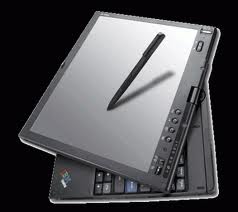
Top Guide Tablet PC X41

Posted by Admin May 28, 2011 0 comments
ThinkPad is a brand of laptop computers that were originally designed, manufactured and sold by IBM with a boxy black design. Since the beginning of 2005, Lenovo purchased IBM'S personal computer Division and started to produced, marketed and developed by Lenovo. Thinkpads is best known for reliability, quality, durability, and their performance, ThinkPads are also very popular with businesses, corporations, and schools; also used in space, and one laptop is certified for use on the international space station.

Tablet PC X41
Tablet PC is indeed smaller models of laptops in terms of appearance and offers most functions of the same. By putting a flat screen, you can use the tablet PC the same way as paper, along with stylus feed for information and write on the screen.

One of the reasons why You need to choose a Lenovo tablet than regular laptops is that the device is very portable because their design is lightweight, making them free of problems when you travel in each place. 

This makes one experience Tablet PC becomes very interesting. If you want smaller personal computers with the added portability, the Lenovo tablet will be the ideal choice for you.

Lenovo thinkpad tablet consists of a number of computers, which brings together the practical function and appearance of eye-catching. Lenovo thinkpad x 41 is an example of this and the version upgrade Lenovo thinkpad x 60. If you lay flat screen, the tablet into a notebook ideal that you can use to write and sketch notes and thoughts.  

Touch screen options also make it easy to browse through other features of the computer. In short, a Lenovo tablet is a personal computer that's perfect for people who want a small size and portability.

Here are some Features of Lenovo Thinkpad X41
  1. The ThinkPad X Series Tablet is the ultimate convertible notebook
  2. It offers extremely long battery life and its small, light form factor makes it easy to carry anywhere
  3. Thanks to new display technologies, you can even use the X Series Tablet outdoors in sunlight
Specifications
  1. Hardware Platform: PC
  2. The System Bus Speed: 400
  3. Manufacturer: Portable Hard Drive
  4. Modem Connectivity: Fax/modem
  5. Weight: 7 pounds
  6. Power Rated Charge (normal use): 6.3 hours
Overall, it is a tablet that is comfortable to use however you want to use it; with screen lay flat or in a regular laptop settings. Lenovo Thinkpad X41 tablet will be the right choice for you. 4DNAF9ZNH66U

Chek Out my other guide on Reviews Acer Tablet

Best Reviews Acer Tablet PC

Posted by Admin 0 comments
acer tablet pc
Acer is one of the largest companies in Taiwan, based in Hsinchu, which was initially a distributor of electronic and consultant in the use of microprocessor technology as Multitech in 1976 and renamed Acer in 1987 and continues to expand globally until now in the field of technology. And in November 2010 Acer officially announced their Tablet PC first with a series of Iconia in New York City – United States.

Operating system Android ™ 3.0 Honeycomb ™ very intuitive, specifically optimized for the tablet, combined with Acer brings a whole new level of UI interactivity put all the resources at your fingertips. Simple operation touch allows playback quick and easy media and users can also write notes, sketching and have fun with the game's intuitive touchscreen. In addition, Android Market lets you choose from thousands of applications and games create your unique Tab.

Acer products including tablet

Iconia Tab A500-10.1 "Android Tablet
Acer Iconia Tab A500 is the first Acer Tablet with Android 3.0 provides Superior Entertainment Mobile, connection to the Internet, Games, movies, social networks. Acer Iconia Tab A500 tablet delivers customers a way to interact and enjoy technology in a way that is completely natural and attractive.

Iconia Tab A500 tablet running Android operating system 3.0 hive. Equipped with an Nvidia Tegra 2 processor and 1.3 mm thick with 1280 × 800 resolution and 1080p HDMI screen capacity. Supports 3 G and Wi-Fi connectivity. Iconia Tab A500 tablet also features a rear facing camera 5 MP plus HD front-facing camera for video chat.


Iconia Tab W500-10.1 "Windows Tablet
Iconia Tab W500 running Windows operating systems. The Tablet comes with the keyboard docking full-size chicklet and supported by the next generation of AMD platforms and features a 1 .3MP camera two. The point of Iconia Tab W500 touch experience early is the ring of Acer. This allows accessing all the features and touch applications pre-loaded. With clear, shared system .fi, Acer Iconia Tab W500 media can be connected to a home network and can share the content of the multimedia device clear. Wi-Fi enabled.

Iconia Tab A100-7 "Android Tablet
Iconia Tab A100 tablet is the smallest tablet Pc from the series.It runs the Android operating system 3.0 honeys and has a capacitive touch screen with 1024 x 600 pixels resolution. Iconia supports several connectivity options, including Wi-Fi and 3 G.

Iconia Smart-4.8 "smartphone/tablet
Acer tablet with the size of the smartphone: 4.8 "widescreen with 21: 9 aspect ratio and screen resolution of 1024 x 480. It runs the Android operating system 2 3 ginger and comes with an 8MP camera with LED flash plus 2MP front camera for video calls.

Chek Out my other guide on tips shop tablet